
Public API
Public API is the local WebSocket for external integrations: software on your machine sends JSON with a method field to open instrument sets, change linking, send notifications, and so on. Everything runs on loopback only (127.0.0.1); ProfitForge does not expose the port to the internet.
Enable: Application → Integrations → Enable integrations. User-facing tab overview: Integrations.
The MCP server (HTTP, AI assistants, read-only) is documented separately — MCP server.
WebSocket API
Connection point
- URL:
ws://127.0.0.1:49152 - Port: 49152 (loopback only). If the port is busy at startup (another process, etc.), the app may try once to free it; if that fails, the server will not start — check the log.
How to enable
- Application → Integrations.
- Turn on Enable integrations (under Integration server).
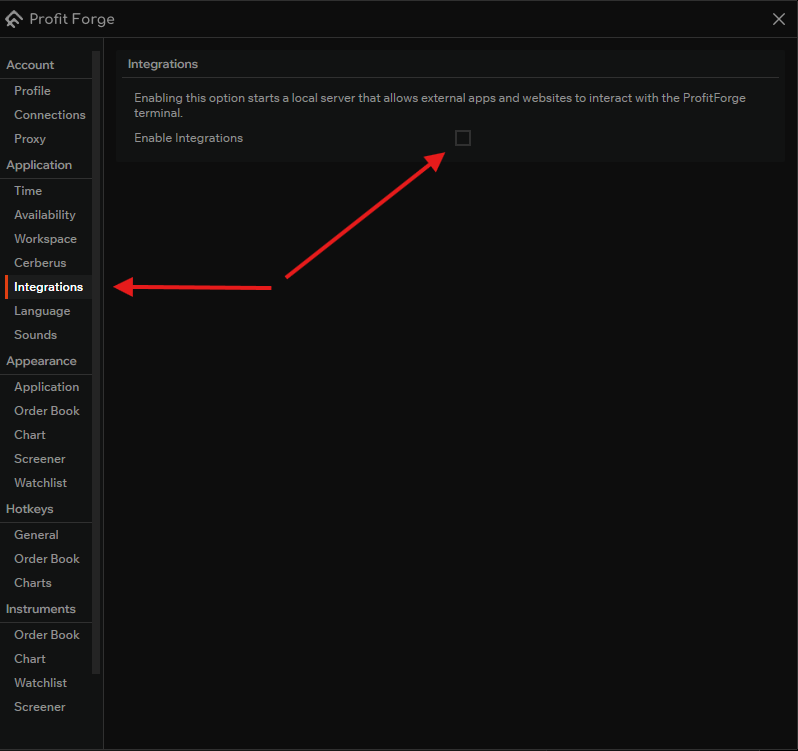
Request and response format
- Request: JSON with a
methodfield and other fields as needed (see Reference and method pages). - Success:
{"status":"ok"} - Error:
{"status":"error","error_code":<number>,"message":"..."}— human-readable text stays inmessage; stable programmatic handling uses numericerror_code(current codes 1000–1008; see Reference — Error responses).
Methods
| Method | Description |
|---|---|
| assign | Update the linked pair for a color. Does not open a new chart/set. |
| open | Open an instrument set (one exchange, symbol). Optional linking_type like the watchlist. |
| open_aggregated | Aggregated set for one display symbol across exchanges; optional title / extra.title. |
| notify | Notification (title, body). |
| ping | Connectivity check. |
assign and open: different jobs — not a required “first one, then the other” chain.
Full field list and enums — in Reference.
See also
- MCP server — separate protocol and port for MCP clients.