
MCP server
The MCP server is a separate local HTTP interface (not the WebSocket Public API): a Model Context Protocol endpoint through which MCP clients invoke read-only tools (quotes, order book, candles, screener metrics, funding, etc.). Orders are not placed.
Controlling the terminal via JSON methods — Public API (external integrations). Where to enable it in the app and how it differs from the integration server — Integrations.
Endpoint
| Streamable HTTP (primary) | http://127.0.0.1:17890/mcp |
| Host / port | Fixed 127.0.0.1 and 17890 (not user-configurable). |
| Access | Loopback only. |
Prefer 127.0.0.1 over localhost if the client resolves localhost to IPv6 (::1) while the listener is IPv4-only.
Some clients support legacy SSE on the same host (e.g. http://127.0.0.1:17890/mcp/sse) with special flags — use Streamable HTTP unless the client requires SSE.
Enable in ProfitForge
- Application → Integrations → Local MCP server.
- Allow local MCP server. On first enable, a bearer token is created if needed.
- Copy URL and Copy token. The field shows a mask; the client needs the full token from the button.
- New token disconnects old clients — update their config immediately.
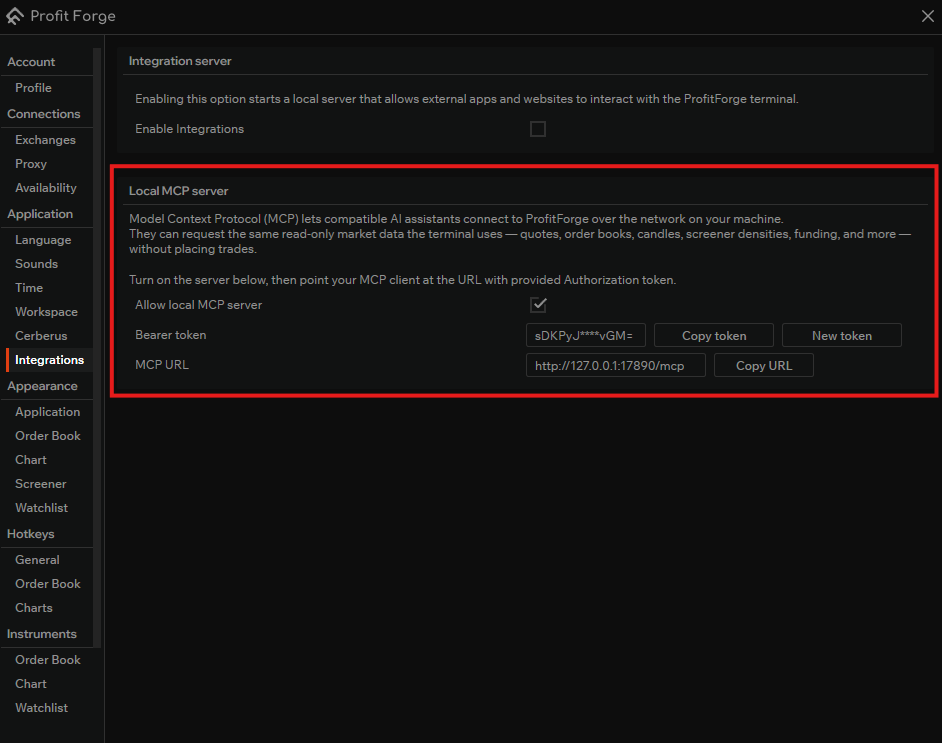
MCP settings (flag + token) are stored only locally on this PC; they are not sent to your account.
Authorization
Every request (except CORS OPTIONS) must contain:
Authorization: Bearer <your-token>One space after Bearer. The token is case and character sensitive.
Invalid or missing token → 401 Unauthorized.
Tools
Tools return read-only data from the same sources that the terminal uses. Typical areas:
- Quotes — prices by exchange + market + symbol.
- Order book — depth / order tape where supported.
- Candles — OHLC by timeframe.
- Screener / context — densities and related snapshots (by implementation).
- Funding — rates and time where there is an integration.
For exact tool names, parameters and JSON see the MCP session (client inspector, protocol list). No tool sends orders on your behalf.
Browser and CORS
Inspectors send OPTIONS without Authorization. The server replies 204 and CORS headers for the /mcp path. Real GET/POST still require the bearer token.
Clients
Configuration example for Claude Desktop
Node.js must be installed for the integration.
{
  "mcpServers": {
    "profitforge": {
      "command": "C:\\Program Files\\nodejs\\npx.cmd",
      "args": [
        "-y",
        "mcp-remote@latest",
        "http://127.0.0.1:17890/mcp/sse",
        "--header",
        "Authorization:${PROFITFORGE_MCP_AUTH}",
        "--allow-http",
        "--transport",
        "sse-only"
      ],
      "env": {
        "PROFITFORGE_MCP_AUTH": "Bearer sDKPyJS0vAFfAm+scr/BRQL+pFB33UveGecR9TCVvGM="
      }
    }
  },
  "preferences": {
    "coworkWebSearchEnabled": true,
    "coworkScheduledTasksEnabled": false,
    "ccdScheduledTasksEnabled": false
  }
}
Troubleshooting
| Symptom | What to check |
|---|---|
| 401 | Token, Bearer + value format; after New token update the client. |
| Connection refused | ProfitForge is not running or MCP is disabled. |
| 406 / Accept | Streamable HTTP expects a correct Accept (JSON + event-stream); narrow headers from bridges can break the request. |
| Timeout / -32001 | Often the wrong bridge entry point (client.js vs proxy.js) or transport; check the client documentation. |
See also
- Public API — WebSocket for external integrations (port 49152).
- Integrations (settings) — both toggles on one screen.